



You finished an offer between shifts, and the reward either hasn't shown up or you'd like to be ready in case it doesn't. Either way, the question is the same: what can you point to?
The short answer is to save the offer's terms before you start, capture each step that would be hard to prove later, and keep the confirmation emails and receipts that arrive along the way. That's a small packet, not an evening project.
Consider an unnamed warehouse worker organizing records for a fictional offer around a shift. This example assumes no payout amount or real provider's procedures. Check the saved terms and ask the provider how they apply; records alone cannot guarantee payment.
The worker keeps the saved terms, activity records and correspondence together, then uses that folder to describe any unresolved issue.
This guide is part of our larger one on evaluating paid survey rewards.
Before starting, save what the offer actually requires
In the fictional example, the worker saves the terms before starting. A later screenshot would record the later page, not establish what an earlier version said. The starting copy gives the folder a reference point for the steps that follow.
In the made-up example, a shopping app invites you to make a first purchase through a link and finish a short activation step. Before starting, you'd capture the page that lists who can take part, which steps count, what the reward is and any deadline it mentions. If the page runs long, capture it in sections so nothing is cut off.
Then write one line for each thing the offer asks for. That short list becomes your checklist for the rest of the process, and it keeps you from saving unrelated screenshots that connect to nothing.
Save the offer's name too, and the page address if you can see it, so you can find the same offer again.
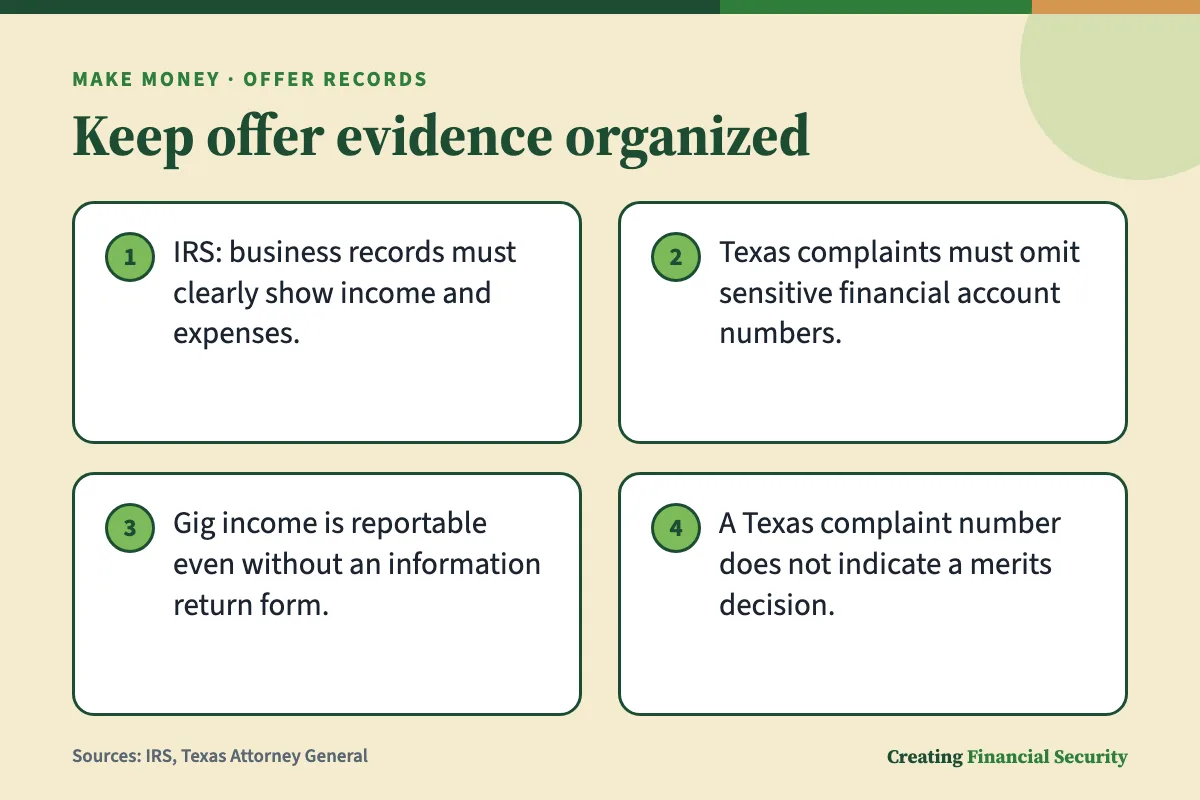
For business records, the IRS allows flexibility in the filing method, provided earnings and costs are clear. That is business tax guidance, not a reward-provider rule. In this fictional routine, the worker uses an ordinary folder rather than building an elaborate filing system.
Match each requirement to a record
Each requirement needs a record that fits it, and each record has limits. Here's how the made-up offer lines up, with what each record can and can't establish.
- Terms. Save the offer page, with the wording and any deadline visible. It shows what you captured, not that you met the terms.
- Eligibility. Save the screen or message that confirms you joined or entered a code. It shows you took that step, not that you qualify.
- Purchase. Keep the receipt or order email, with the merchant and order reference visible. It records the transaction, not every eligibility requirement.
- Milestone. Save the status screen after the step is done, with the offer name and relevant status wording visible.
- Reward status. Keep any message from the offer provider about the reward. It records what the provider said then, not that money arrived.
In the example, these labels help the worker distinguish a documented step from an unanswered question before writing to support.
How it works, step by step
- Before uploading anything to a Texas complaint, check each attachment and cover birth dates, government ID details and account numbers.
- Describe the problem plainly and add the dates that matter.
- For a Texas complaint, gather the business name and contact details, including its full address, before starting.
- Keep the confirmation email and reference number you receive after submitting.
Capture the steps that could be hard to prove later
You don't need to record every tap. Think about which moments leave no trace once they're over, and save those. In the made-up offer, these are the ones worth keeping:

- Enrollment or opt-in. Save the screen showing that you joined the offer or entered the link or code.
- Activation. If the offer asks you to switch on a setting or finish a form, save the screen showing it's done.
- The milestone. Save the success screen or status page for the step the terms say counts.
If a step sends an email, keep it too. An email may show a sender and a date that a bare screenshot doesn't, and it's a message the provider generated rather than a picture you took.
In the fictional warehouse routine, the worker saves the terms before clocking in, captures the activation screen at a break, and files the confirmation email after the shift. Each record goes into the same folder as it becomes available.
If a step in the fictional example produced no confirmation, the worker would label the log entry as a personal note: what happened and when. That keeps a recollection separate from a message actually received from the provider.
Make the context visible
A screenshot of a bare success message says very little. Context is what makes it useful.
- Identifiers. If the screen shows an offer name, order reference or confirmation number, keep it in the frame.
- Visible status. Capture the status wording the screen shows, such as pending or completed, so the stage is clear.
- Dates. Include any date the page itself displays. Your phone's file timestamp can help you remember when you saved something, but it isn't a date the provider confirmed.
- The whole screen. A cropped corner is harder to match to your account and your order.
Keep passwords out of every image. If a screen shows one, skip that capture or cover the password before sharing anything.
Keep completion proof separate from purchase proof
A purchase receipt, a completion screen and a reward confirmation record different facts. Keeping them apart lets you describe a problem accurately.
A receipt can establish that a transaction happened. It doesn't establish that you were eligible or that every other requirement was met.
A completion screen shows the status displayed at that moment; it does not independently establish eligibility or reward approval.
A reward confirmation, such as a message from the provider about the reward's status, speaks to the reward itself. Even that is separate from the payment arriving, which is a different record again.
Laid out this way, a short statement is easy to write: these steps are complete, this purchase was made, and the reward status hasn't changed. If you have a receipt and a success screen but no reward message, you know which link is missing, and you can say so plainly.
Save confirmations as well as screenshots
When the offer involves a purchase, a few confirmations are worth keeping. None of them guarantees a reward; they're pieces of a timeline.
- Any order confirmation email.
- Any email from the offer provider saying it received the activity.
- A cancellation or refund confirmation, if you cancel or return something later.
In the example, the worker files the relevant emails alongside the screenshots so the timeline can be reviewed in one place.
Build a small evidence folder without exposing private data
One folder per offer keeps records from scattering. In the made-up example, the shift worker makes a folder named for the offer and saves into it around the workday. A simple layout:
- Terms: the saved offer page
- Steps: enrollment, activation and milestone screens
- Receipts and emails: purchase confirmations and provider messages
- Log: one short note or a simple spreadsheet
Privacy matters as much as completeness. The Texas Attorney General tells complainants to omit sensitive details, including birth dates, government identification and financial account numbers. That instruction belongs to that office's complaint form; other recipients differ, so it helps to ask what a given support team needs before you send personal details.
The same office says supporting documents aren't required for its complaint but may help it understand the situation. More files isn't automatically better. For the fictional request, the worker chooses attachments that connect directly to the issue described.
Some processes do need identifying details. A written card billing-error notice, for instance, has to let the creditor identify your name and account number. So the right amount of detail depends on who is asking and why.
Keep originals and make separate sharing copies
- Save the original screenshot or receipt untouched in your folder.
- Make a copy for sharing, and cover anything the recipient doesn't need.
- Name the copy so you can tell it apart, for example by adding the word shared to the file name.
- Check the copy before sending to be sure the covered areas can't be read.
- Send only what supports the specific point in your request.
If support asks for something sensitive, such as a full bank statement, it's reasonable to ask which details are necessary and how to send them securely. Never share account passwords, and use the support channel named in the offer's own terms or help page.
Track pending rewards and the dates that matter
After you finish, the made-up offer's page might show a status such as pending. Whether a real offer does, and what it means, is something its own terms or help page would have to say.
That's why the terms you saved matter here. If they mention a crediting period, a claim deadline or conditions under which a reward can be cancelled, those are the dates to write down. If they don't mention any, the log still shows how long you've been waiting, which is useful to tell support.
A short log connects your evidence to those dates. It also keeps an unfinished offer from sitting in your head as an open task.
In the fictional log, pending remains an unresolved status rather than a prediction of payment. The worker records any explanation received from the provider beside that entry.
Use a log that takes little effort to maintain
Keep the log to a handful of blank fields you can fill in on your phone:
- Offer name or reference
- Key terms you saved (steps, deadline, crediting period if any)
- Date you completed the offer
- Where the evidence is saved
- Status (pending, paid, denied, cancelled)
- Follow-up date
The IRS requires reporting gig-work income even without an information return. That rule does not by itself determine the tax treatment of a particular reward; the IRS or a tax professional can address that question. The agency also describes identifying income sources and preparing returns as reasons for maintaining business records.
Turn missing credit into a clear support request
For the fictional missing-reward request, the worker uses a short timeline and relevant records. This is an organizational sequence, not a provider's submission procedure; the actual offer's support instructions remain the place to check the required route.
- Find the official support route in the offer's terms or help page, rather than answering a message from an unknown sender.
- Check your log for the dates, status and terms that apply.
- Pick the few records that matter: the terms, the milestone screen and the relevant confirmation.
- Use the sharing copies with unneeded sensitive details covered.
- Send the request and save the ticket or reference number you get back.
The Texas Attorney General's form is a useful picture of what a clear complaint contains. It wants a plain description of the problem with the dates that matter, plus what you've already tried, including your communications with the business and the names of people you spoke with. The fictional support message uses those categories to organize its account of the problem.
If you do use that form, the online system can't save a half-finished complaint, so it helps to gather the business name, its address and your documents first. Uploads have limits of 25MB for file size and up to 10 files.
Send a short timeline and relevant attachments
Here's a fill-in message for the made-up offer. Replace the brackets with your own details, and leave out anything you can't back up.
I completed [offer name] under the terms I saved on [date terms were saved]. I enrolled on [date], finished activation on [date], and completed the required purchase on [date]. The reward status still shows [status]. I've attached the saved terms, the milestone screen and the order confirmation. Could you tell me whether the reward will be credited, or the reason if it won't?
It contains no promises and no guesses. It states what happened and asks a direct question.
If support rejects the claim or does not respond
If you get a denial, you can ask for the reasons in writing. A denial may point to a term you missed, or to something your records can answer.
If there's no response, consumer routes exist. USAGov describes resolving an online-purchase complaint with the seller or website first, then turning to federal or state agency help.
After a Texas complaint is submitted, a confirmation email arrives with a unique number, and the office says to save both. That number is for reference only. It doesn't mean a decision was made about the complaint's merits.
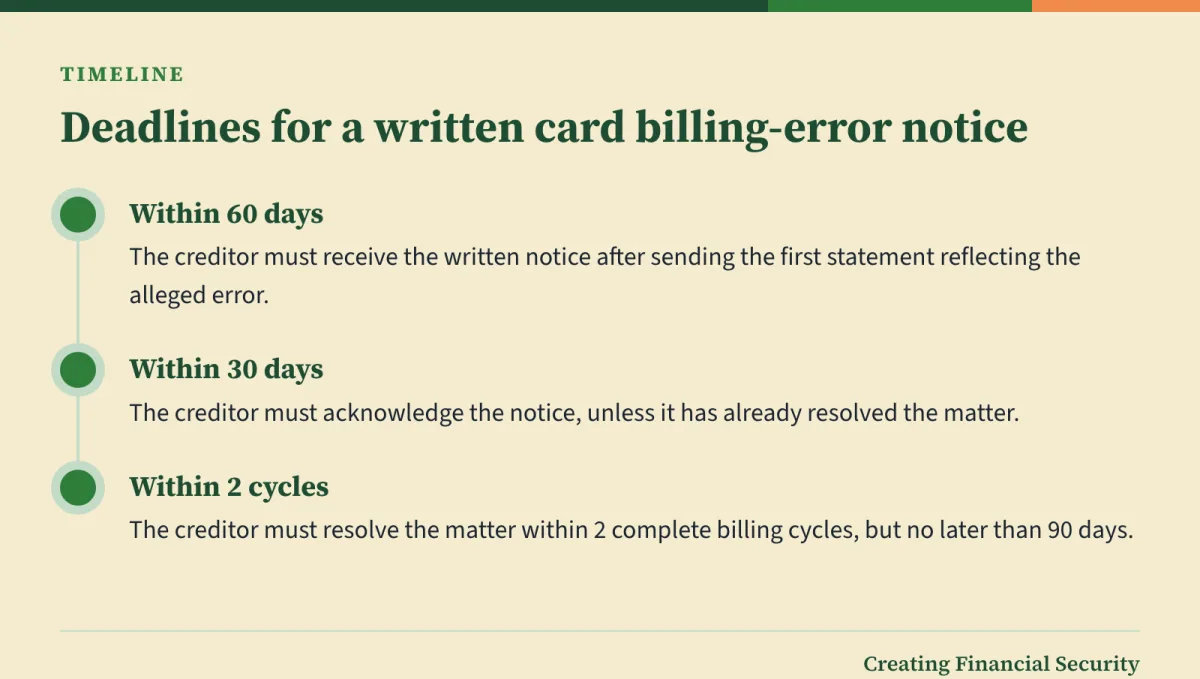
A missing reward is also different from an alleged billing error on a credit card. Regulation Z lists billing errors that include charges for goods or services not delivered as agreed, and a failure to properly credit a payment or other credit to the account. For this procedure, the creditor must receive a written notice at its designated billing-error address within 60 days after it sent the first statement reflecting the alleged error. The notice must identify the consumer and account and, where possible, explain the suspected error, including its type, date and amount.
The creditor then has to acknowledge the notice within 30 days, unless it has already resolved the matter, and resolve it within 2 complete billing cycles, but no later than 90 days. Whether a missing promotional reward fits any of those categories depends on the facts, and some accounts fall under different error rules instead. The card issuer or a consumer agency can say which route fits your case.
Close the record when the offer ends
Recording the outcome can help close your log. When the offer ends, update it with the result:

- Paid. Note the date and where the payment confirmation is saved.
- Denied. Save the denial message and any reasons given.
- Cancelled. Save the notice and note what your saved terms said about cancellation.
- Refunded or returned. Save the refund confirmation next to the original receipt, and check the saved terms for how a return is treated.
In the fictional log, the closing entry records the outcome and points to the final message or confirmation.
Keep the final outcome with the original terms
Put the final record in the same folder as the saved terms, so the whole story sits together in one place.
Before deleting the fictional folder, the worker would check any applicable claim, refund or dispute deadlines rather than assume a universal retention period. Tax records require a separate check: the IRS ties retention to the period during which records are necessary to substantiate reported earnings or deductions. The IRS or a tax professional can explain the requirements for a particular reward.
The bottom line
A useful evidence packet is small: the offer's terms as they were when you started, a screenshot of each step that would be hard to prove later, the receipts and emails that confirm what happened, and a short log of dates and status. Keep originals untouched, and send separate copies with unneeded sensitive details covered.
These records can support a missing-reward claim, but they can't force a payment, and a receipt or success screen doesn't settle eligibility on its own. For an unresolved purchase complaint, USAGov identifies company, federal and state routes for seeking help. A card billing-error procedure is separate and may apply only if the facts fit its requirements. The card issuer, a state consumer office or a licensed professional can help with your own case.
Questions readers ask
What if I forgot to screenshot the original offer?
Can a screen recording replace screenshots?
Does a receipt prove that I earned the reward?
Should I send my full bank statement to support?
What happens if I cancel or return a purchase after completing an offer?
How long do I need to keep the records?
Sources
- Internal Revenue Service: Tax treatment of side income, including income received without an information return
- Internal Revenue Service: Recordkeeping for receipts, expenses and payment evidence
- USA.gov: Complaints about consumer products and services
- Texas Attorney General: File a consumer complaint
- Electronic Code of Federal Regulations: 12 CFR 1026.13 -- Billing error resolution