



You're partway through a survey screener and a question looks simple: what do you do for work, or what does your household bring in? Then the answer choices don't quite match your life, and you wonder which box is the safe one.
The plain answer is to choose the one that is true for the exact question, the exact time period and the exact person or household it asks about. Skip the one that seems most likely to get you in.
Consistency doesn't mean repeating one answer forever. It means describing the same real facts accurately, and updating an answer when the facts change. If your situation is different now than it was last spring, a different answer today is the consistent one.
A screener is a set of questions to understand, not a test to beat. There is no need to reshape a fact to fit an answer choice. If none captures what you know, look for clarification rather than inventing a response.
This guide is part of our larger one on whether paid surveys justify the time.
A quick check before choosing an answer
Similar-looking questions can ask for different facts, so a few seconds of reading goes a long way. Four checks, in this order, cover most of it:
- Who is the question about? You alone, or a defined household?
- What does it define? Does the question or its help text say what counts and what doesn't?
- What period does it cover? Right now, last month, the past 12 months, or some other window?
- What choices are offered? Is there an option that fits, an uncertainty option, or a way to skip?
The Census Bureau's online form for the American Community Survey (ACS) says most screens carry helpful instructions, and it puts a blue "(Help)" link after the question. If a screener has a help link, a hover note or a footnote, read it before you pick.
The American Community Survey is a government questionnaire, not a paid-survey screener. Its instructions explain how to complete the ACS; they do not establish the rules for another survey. For a paid screener, use the definitions attached to that question rather than importing an ACS definition. A familiar word such as work or household is not a reason to skip its instructions.
Similar wording can ask for different facts
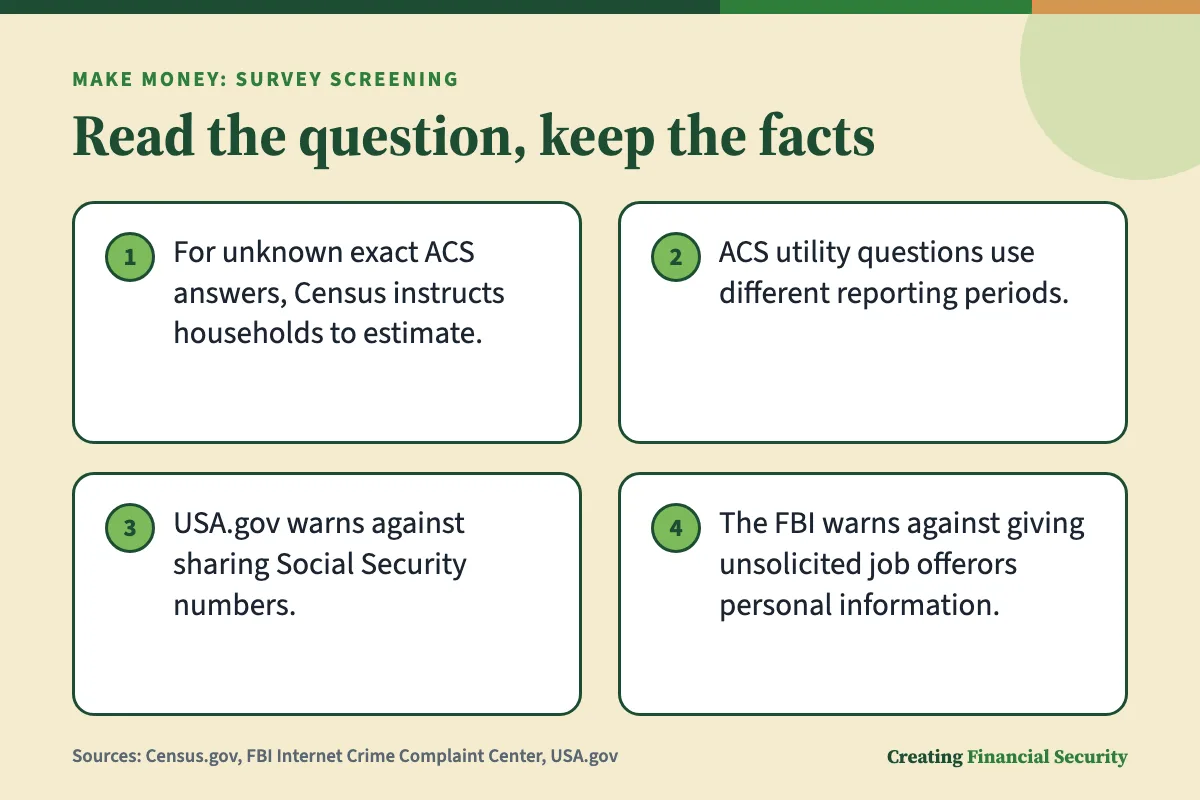
The ACS instructions show how much a small change in wording matters. One group of utility questions asks for last month's costs. Another asks for total costs over the past 12 months. Same subject, different clock.
For schooling, the ACS asks which grades someone attended during the last 3 months. During summer, it specifically excludes grades the person has yet to attend.
Household questions carry their own definitions too. For the ACS household listing, a person staying elsewhere for more than 2 months is excluded; a student away at college is one example. Read the membership instructions rather than relying only on an everyday understanding of household.
Carry the pattern over to any screener. Last month isn't the same as a usual month. Attended isn't the same as planning to attend. You isn't the same as everyone at your address. When two questions seem to repeat, check which of these words changed.
How it works, step by step
- For an ACS answer that cannot be exact, Census calls for an estimate if nobody in the household knows.
- Reread a repeated question for a changed period, since similar costs can be asked for last month or for the past 12 months.
- For questions about completing the ACS, Census staff can explain individual questions.
- If you suspect a task scam, report it to the FBI's Internet Crime Complaint Center.
Match income and work answers to the question
For income and work questions, start with the definition rather than the answer bracket. The ACS instructions do not supply a definition for a paid screener's income questions. Look for that screener's own explanation before deciding which earnings it asks you to report.
Things to look for in any income or work question:
- Personal or household. Check whose income the question includes, and how it defines the household. As the ACS shows, who counts as living at an address can have rules of its own.
- Gross or net. If the question says before taxes or after taxes, use that version. If it doesn't say, look for help text rather than choosing the number that looks better.
- Employment category. In the ACS, paid work is not limited to a salaried main job: wages, commissions and tips also count. Its work definition includes part-time activities such as babysitting and newspaper delivery. By contrast, doing chores around your own home or volunteering without pay does not count under those instructions.
- The answer choices. If your situation fits two categories, look for an "other" option or a note saying you may choose more than one.
A work question can be wider than a job title. Under an ACS-style definition, occasional paid side work can fall inside "work." Whether it belongs in a given screener depends entirely on that screener's wording.
Overtime and side earnings need the right time period
Overtime and side earnings are easiest to handle when you treat the question as a window on your calendar. The window is whatever the question names: this week, last month, the past 12 months.
As a made-up illustration, suppose a question asks about work last week. Whether you did any side work last week is a plain fact, and the answer is whatever happened. If an income question uses a similar window, the same logic applies to pay in that window. Whether overtime within that window belongs in the answer depends on the survey's definition of income and whether it asks about pay earned or received.
Those two words, earned and received, can pull in different directions. Pay for a shift worked at the end of one period might arrive in your account in the next. If the question doesn't say which it means, its help text is the place to look.
Do not trim or pad a number to reach a particular bracket. Work from the requested definition and period; a preferred answer choice is not a reason to change the underlying facts.
| Check | What to look at | What it prevents |
|---|---|---|
| Whose information | The ACS requests details for each household member | Substituting one person's facts for another's |
| Utility costs | Last month for some items, the past 12 months for others | Using the wrong window |
| School attendance | Grades attended during the last 3 months; summer instructions exclude future attendance | Treating a plan as attendance |
| Paid work | The ACS includes several kinds of compensation, not just salary | Missing work paid another way |
| Part-time activity | The ACS includes babysitting and newspaper delivery | Leaving out side work |
| Unknown figure | A best estimate when no one in the household knows | Inventing an exact figure |
When memory is fuzzy, do not turn a guess into a fact
A missing purchase date or an uncertain dollar amount is a reason to slow down, not to invent precision. First check whether the question allows an estimate.
The ACS asks households for a best estimate of things like what their home would sell for when no one in the household knows. For age, it says to provide an estimate if the exact age isn't known, while also saying not to round an age up because a birthday is close.
That last rule is a good model. An estimate is your honest best reading of the facts. It isn't a rounding in whichever direction helps.
A way to work through a shaky memory:
- Read what the question says about estimates. If it permits an estimate, follow those instructions. If the wording leaves you uncertain, look for clarification before entering a figure.
- Check whether a record can settle it. An order confirmation, a statement, a pay stub or a calendar entry may be enough.
- Look for an honest uncertainty choice. An option that says you don't know or aren't sure accurately describes what you know.
- Use the help the survey offers. Census staff can explain individual ACS questions. For a paid screener, direct questions about its definitions to its own help or support channel, if one is available.
A purchase-date example without an invented answer
Say a screener asks whether you bought a certain kind of item within a stated window, and you can't remember when you last bought one. You don't need to invent a date or a purchase to move forward.
Start by rereading the window and noting exactly what it covers. A window with named start and end dates is a different question from "recently." Then look for a receipt, email or statement that shows a date. If you find one, answer from it.
If you don't find one and the survey offers an "unsure" or "don't remember" choice, that choice is accurate. If it offers only yes and no and you honestly can't tell, you haven't failed anything. The question as built just can't capture what you know, and a confident guess that turns out wrong helps no one.
Update real changes instead of preserving old answers
A lot of worry about consistency is worry about contradicting yourself. But facts move, and truthful answers move with them.

Consider a hypothetical promotion that has been offered but has not begun. For a question about current work, distinguish the offer from a role already started. The ACS makes a comparable distinction in its marital-status instructions: selecting divorced requires an actual divorce decree, not a plan to obtain one.
As a made-up illustration, imagine a question about your current employment while a new role is set to start next month. Your answer describes the current role. Once the new role begins, check whether the question's wording and choices call for a different answer. Both answers were true when you gave them, and neither contradicts the other.
The exception is a question that explicitly asks about expectations, such as whether you expect to change jobs. There, your honest expectation is the fact being asked for.
The same goes for side earnings that start, stop or change. If a survey site keeps a profile, updating facts that have really changed through its own process is ordinary upkeep. Changing facts so a particular survey will take you is a different thing.
Keep a small reference note, not an answer script
An optional reference note can record dates without becoming a script. Keep it focused on facts and definitions, not on a set of answers to reuse regardless of the question.
- The month a job or side activity began or ended
- Where your pay records are kept, rather than the figures themselves
- A definition that tripped you up, in your own words
- The date you last updated a survey profile
Leave out sensitive identifiers. USA.gov advises keeping banking details, Social Security numbers and birth dates private. It also says to keep a Social Security card somewhere secure instead of carrying it in a wallet.
Handle repeated questions and mistakes calmly
Surveys sometimes ask about what looks like the same thing in slightly different forms. Treat each one as a fresh question.
- Reread the wording. Look for a changed subject, period or definition. Utility costs for last month and for the past 12 months look alike and aren't.
- Answer from your facts, not from your memory of what you said before. If the questions really are the same, true facts will match.
- If you realize an earlier answer was wrong, correct it where the survey allows, through an edit option or a support contact. If there's no way to correct it, building a new false answer to match the old one only adds a second error.
- Use the help that's offered. A help link, hover note or support page may explain a definition you missed.
Do not assume what a screening system is checking
Do not infer a hidden rule from a repeated question. Before trying to explain why it appeared, reread it for differences in subject, definition or time period. The ACS utility-cost instructions give a concrete example: similar questions can require different reporting windows.
Use the wording and help text you have, rather than a theory about scoring or account penalties. If no explanation is given, leave the system's purpose unresolved instead of treating a guess as an instruction.
If a question puzzles you, find out what it is for. The Census Bureau, for instance, keeps a separate page explaining why each ACS question is asked, apart from the page explaining how to answer. A paid screener may offer a privacy notice or help page that does something similar.
An honest answer can still have a privacy boundary
Honesty means not making things up. It doesn't mean handing over everything that's requested.

The ACS instructions show one version of this. If a household member doesn't want to give personal information, the respondent still gives that person's name and answers a few questions, and an interviewer may call that person for the rest.
Options worth looking for in a paid screener:
- A skip or nondisclosure option. If the screener offers a way to decline, that lets you express a privacy choice without making up an answer.
- A privacy notice or help text that may explain why a question is asked and what happens to the answer.
- Ending the survey, which stops your participation but keeps everything you've said true.
Check the participation rules before relying on a skip option. Declining to disclose is a privacy choice, not a way to seek a particular result.
Information worth pausing over
A question about household membership and a request for an account identifier call for different checks. Before disclosing identifying details, pause over what is being requested.
Pause over requests for sensitive identifiers or for payment. USA.gov warns that online surveys and quizzes can be used to collect information for identity theft. Its guidance is to keep banking details, Social Security numbers and birth dates private.
The FBI describes bogus remote-work offers involving simple tasks. In those scams, people are asked to pay with cryptocurrency to earn more or unlock work. The agency flags requests to pay an employer in cryptocurrency and warns against giving personal or financial details to people who send unsolicited job offers.
If you suspect a task scam, the FBI asks victims to report it to its Internet Crime Complaint Center.
After a screen-out, leave the answers alone
Do not treat an unexplained screen-out as proof that you answered incorrectly. Read any explanation the survey supplies. Without one, avoid assigning a cause or deciding that a different personal fact would have been the right answer.
The tempting move is to go back and change an answer to see if it works the second time. If the original answer was true, changing it makes your profile less accurate. If it was a mistake, correcting it through the survey's own process is different from re-entering with new facts to get in.
- Note what the screener said, if anything.
- Check for a real error. Reread the question and your answer. If you misread it, see whether the survey has a correction process.
- If the answer was right, let it stand. Do not infer dishonesty from an unexplained result or rewrite a true fact to try again.
- Move on. Your time is yours to protect, and one closed door doesn't change what's true about you.
What to ask when the instructions are unclear
For an unclear instruction, possible questions for the survey's support channel include:
- What does this term mean here, and which period does it cover?
- Can I correct an answer I gave by mistake, and how?
- Is there an option for people who don't want to answer this question?
- If I'm screened out, can I ask why?
- How is my profile information stored, and when can I update it?
These are requests for clarification, not requests to change the facts. Keep any message focused on the wording or procedure you need explained, without including sensitive identifiers.
The bottom line
Screening questions get easier when you stop guessing what the survey wants. Read who the question is about, what it defines, which period it covers and which choices it offers. Then answer from the facts. Follow the question and its help text on estimates. If the instructions are unclear, ask for clarification; if you cannot answer truthfully, you can leave.
Overtime, side earnings and an offered promotion are facts with dates. Describe them as they stand for the period the question names, and update when something real changes. An offered nondisclosure option or ending the survey are honest ways to hold a privacy boundary, and requests for sensitive identifiers or payments are a reason to pause.
Accuracy, rather than qualification, is the goal. For personal pay or tax questions, a licensed professional can help. For a screener's definitions and procedures, contact the survey's own support channel.
Questions readers ask
Where can I ask about an unclear ACS question?
Which identifying details does USA.gov warn against sharing?
How does the ACS handle a household member's privacy objection?
Does the ACS allow estimates when an exact answer is unknown?
Should an expected change be reported as already completed?
Sources